
Attendance Only From Where It Should Be
Set geographic boundaries for check-ins and ensure every attendance mark comes from the right location, automatically.

Location-Accurate Attendance

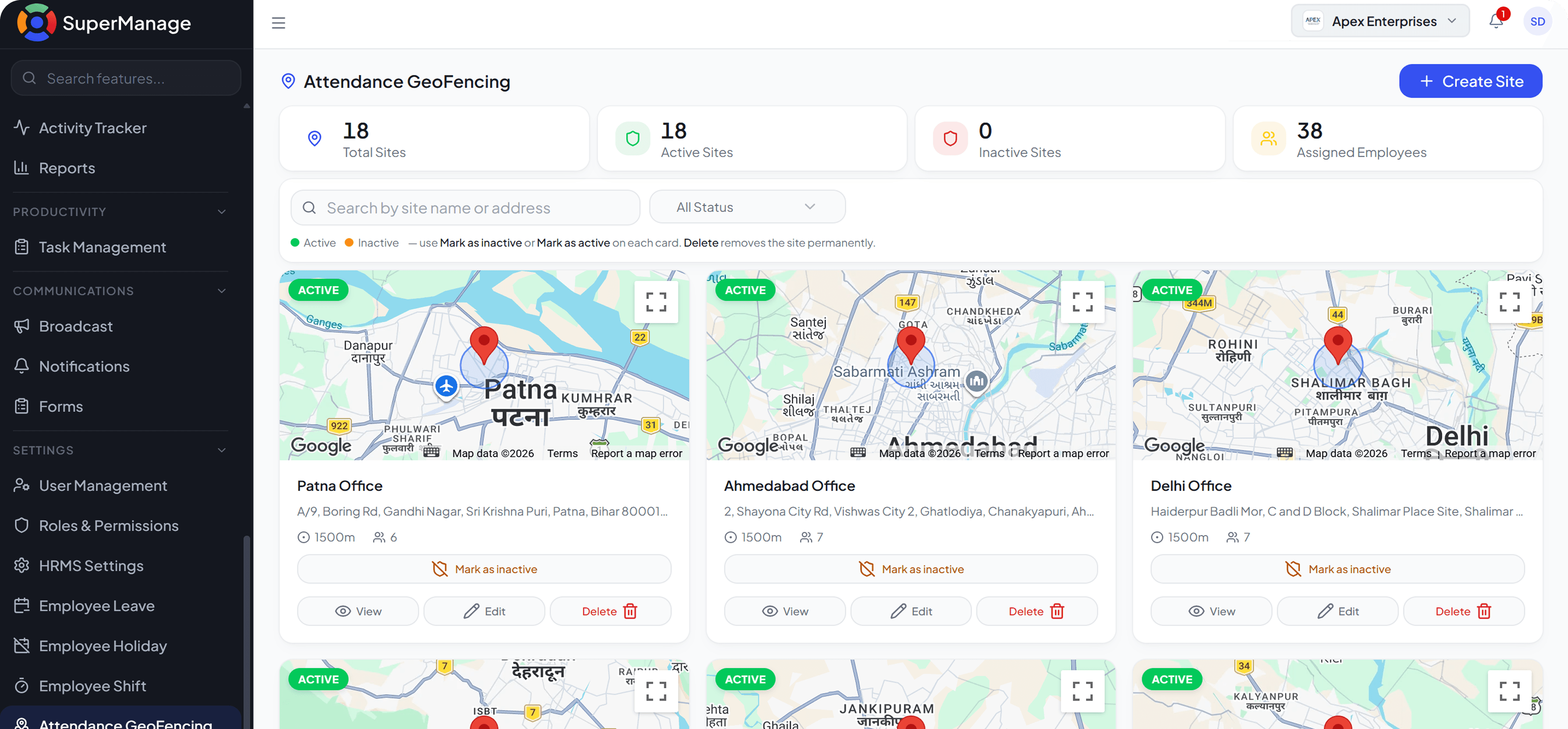
Custom Geofence Zones
Define the exact area within which employee check-ins are accepted for any site or location.

Automatic Boundary Enforcement
Check-ins outside the defined zone are blocked or flagged without any manual monitoring needed.

Multi-Site Support
Set different geofence boundaries for different offices, sites, or field locations.
Precision Attendance For
Every Location.
GPS-based geofencing that ensures every attendance record reflects the actual location of the employee.
Frequently Asked Questions
Geofencing allows businesses to define a geographic boundary around a location. Employee check-ins are only accepted if they happen within that defined area.
Yes. Different zones can be created for different offices, warehouses, sites, or field areas and assigned to the relevant teams.
The system either blocks the check-in or marks it as an exception for manager review depending on how the rule is configured.
Yes. Field employees can be assigned flexible zones or moving check-in points so their locations are tracked accurately regardless of where they work each day.
Yes. The check-in location is captured and stored, and managers can view it through the attendance dashboard or reports.
No. Geofencing works through the SuperManage mobile app available on iOS and Android. No additional hardware is required.